How Global Contacts works
Understand vendor matching, usual accounts, company shares, and learning from bills in Firm brain.
In this guide
Global Contacts brings together the vendors used by the companies you can access. It shows which account those companies usually book a vendor to, and how much agreement there is between companies.
Open Firm brain → Global contacts. Members can browse contacts from their assigned companies. Admins can also control learning and manage supporting knowledge. Your active firm and company access determine every total you see.
What appears in the list
Each row shows a vendor, its TIN when known, the number of companies that have that contact, the usual account, the share of companies using that account, and bills learned.
Contacts can appear before learning is turned on: the list starts from the companies' synced contacts in Juan. Account patterns need eligible purchase bills to be read. A blank account does not mean a vendor has never been used; there may simply be no learned evidence yet.
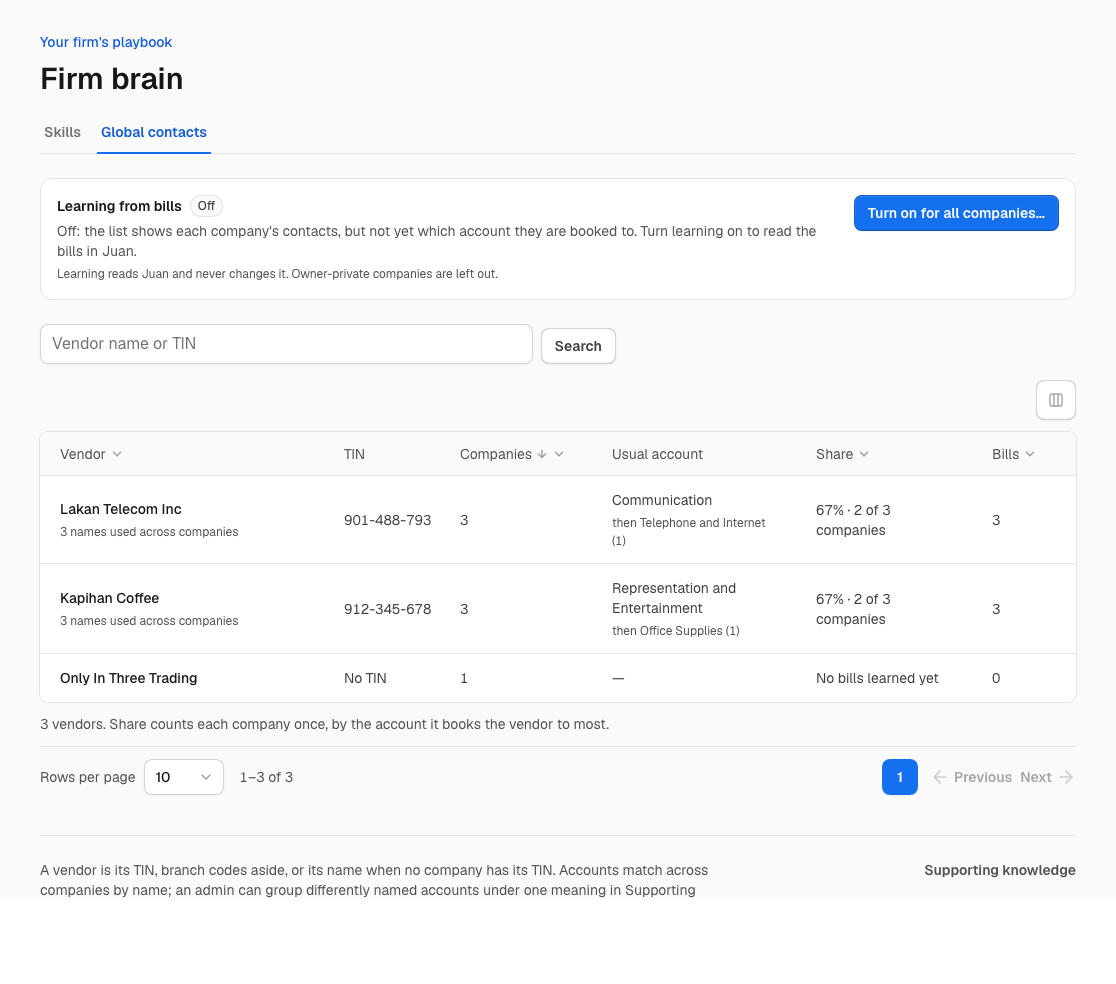
Synthetic demonstration data. Names and figures are examples.
How vendors are matched
A known TIN is matched on its first nine digits. Branch codes do not create separate vendors. Two contacts with the same TIN root can therefore appear together even if their displayed names differ.
When no company knows the TIN, Mendiola uses a normalized name. Common company suffixes at the end of the name are removed for matching. A contact without a TIN can join a TIN-known vendor when there is exactly one matching TIN-known vendor with that normalized name. Ambiguous names are not assigned a TIN by guesswork.
This is not general fuzzy matching. Different spellings or a person's name with and without a middle initial may remain separate. Search by name or TIN before assuming a vendor is missing.
How the usual account and share work
The share is by company, rather than by the number of receipts. Each company contributes its most-used account for that vendor. The winning account's share is measured among companies with learned account evidence; companies that only have the contact do not create an account vote.
For example, imagine three companies with learned purchases from Kapihan Coffee:
| Company | Its most-used account | Learned lines |
|---|---|---|
| Demo North | Meals | 50 |
| Demo East | Staff welfare | 2 |
| Demo South | Staff welfare | 3 |
Staff welfare wins two of the three company votes: about 67% · 2 of 3 companies. Demo North's fifty lines do not outweigh the other two companies. The vendor detail page also shows line counts, so you can inspect the evidence behind the company result.
Below a 60% company share, the list says Companies disagree. This describes the recorded pattern. It does not decide which company's accounting is correct.
Accounts match across companies by normalized name; an ampersand is read as “and.” An admin can group differently named accounts under one meaning in Supporting knowledge. Those mappings affect the grouping.
Turn learning on
An admin works from Learning from bills above the list:
- Choose Turn on for all companies….
- Set Read bills dated from to the accounting date from which bills should contribute.
- Read the confirmation and choose Turn on.
- Return to Global Contacts to follow how many companies have been read and when the last read finished.
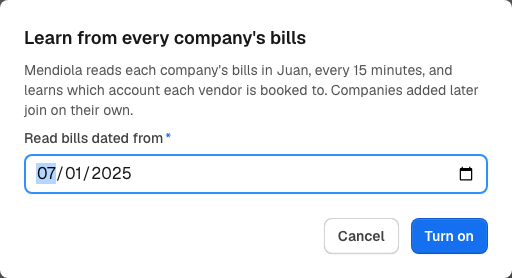
Synthetic demonstration. Turning learning on reads bills; it does not send transactions.
Learning covers active, shared companies in the firm that have a Juan organization connected. New or restored eligible companies join on later scheduled passes. Owner-private companies are excluded.
The task runs every fifteen minutes and reads companies in batches. A run does not guarantee that every company's history is complete within fifteen minutes; the initial read can take several passes. Eligible active purchase bills entered directly in Juan can contribute even without a file uploaded to Mendiola. Drafts are not evidence that a person reviewed them.
Learning reads Juan and never changes its books. It is independent of the company's sending settings.
Pause learning
An admin chooses Pause learning and confirms. Scheduled reading stops, while what has already been learned stays in Global Contacts. Pausing does not erase the vendor list or delete any bill in Juan.
Inspect a vendor or forget a bill
Choose the vendor's name to open its detail page. Inspect the accounts, the company and line counts, the companies behind the result, and the latest learned bills.
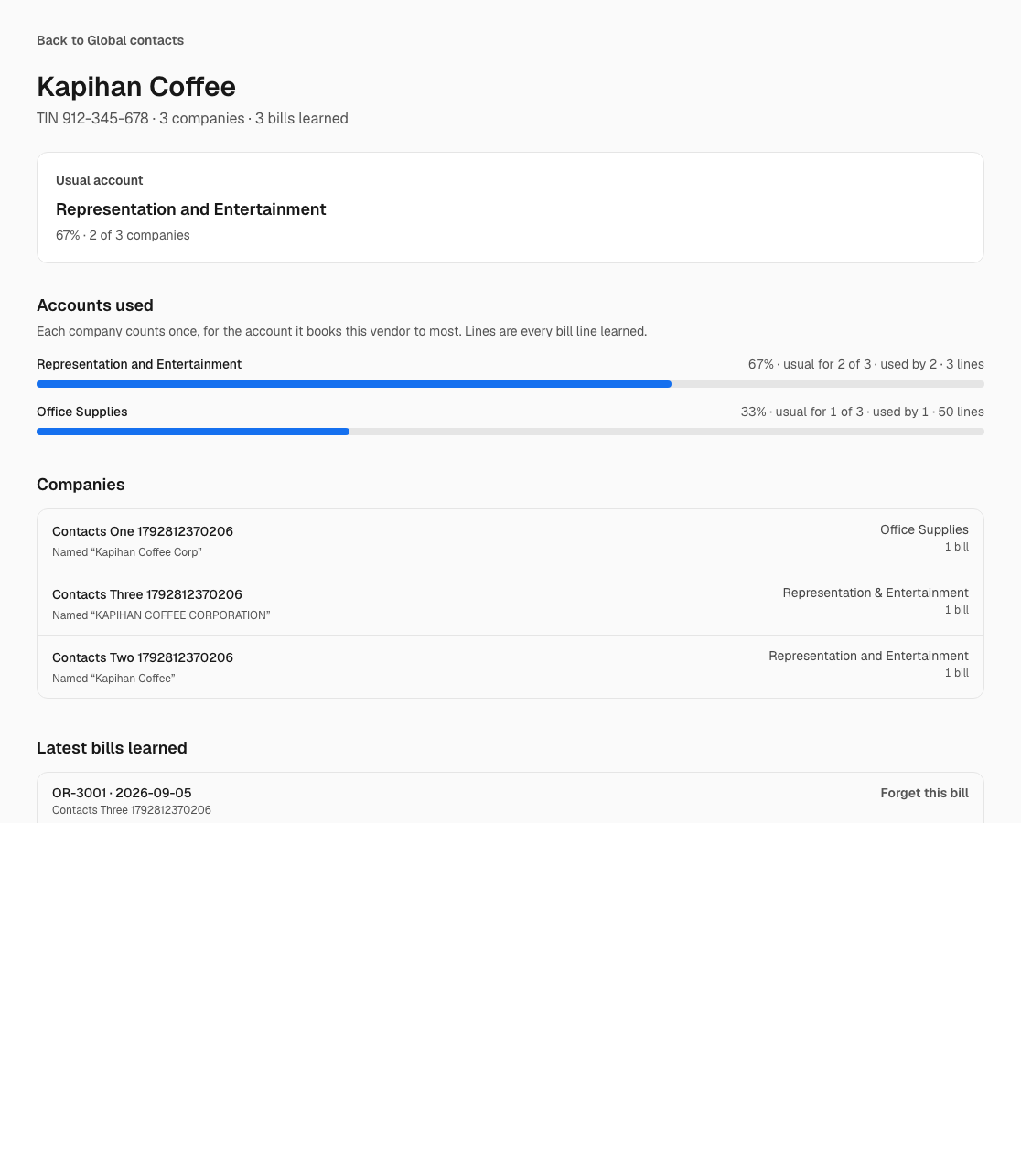
Synthetic demonstration data.
An admin with access can choose Forget this bill, review the confirmation, and confirm. It removes that bill's contribution from learning and excludes it from being learned again on a routine pass. Counts and the usual account may change. It does not delete or alter the bill in Juan.
Why another person sees different totals
Every aggregate follows the viewer's access. Members count their assigned companies. Admins see the shared companies in their firm. An owner-private company's contact evidence is visible only to its creator, and cannot increase another person's totals. The learning switch still excludes owner-private companies, including for their creator.
Changing firms changes the available contacts. The list is not a directory shared across unrelated firms.
Missing accounts or failed reads
- Contacts but no usual account: check whether learning is on and whether the company has been read. Eligible bills must exist within the selected date range.
- A company could not be read: ask an admin to check its Juan connection in Company settings → General, then follow the next scheduled read.
- Separate rows for similar names: check TINs and spelling. Name-variant merging is not implemented.
- Unexpected usual account: open the vendor and inspect the companies and lines. Ask an admin to review account meanings and incorrectly included evidence.
Current limits
Global Contacts describes observed accounting choices. It does not verify invoice validity or prove that a named person approved a bill. Its examples do not become legal-rule findings.
Automatic account suggestions on workbook lines or Juan document drafts are not built. Neither are AI-assisted name-variant merges. Seeing a usual account here does not make Mendiola apply it to a transaction.